Split the pair at the slash. In BTC/USDT, BTC is the base asset, the thing you are buying or selling. USDT is the quote asset, the unit the price is written in and the asset that settles the trade. A buy on this pair spends USDT and delivers BTC. A sell hands over BTC and returns USDT.
The price column always answers one question: how many units of the quote asset does one unit of the base asset cost? A price of 80,000 here means 1 BTC for 80,000 USDT. On a pair such as ETH/BTC the unit becomes BTC, and reading that number as dollars puts you off by several orders of magnitude.
The currency in brackets on the order book header is that column's unit
On Binance's public spot trading page the order book header reads "Price (USDT)", "Amount (BTC)" and "Total". The bracketed symbol tells you the unit. Amount is counted in the base asset; price and total are counted in the quote asset.
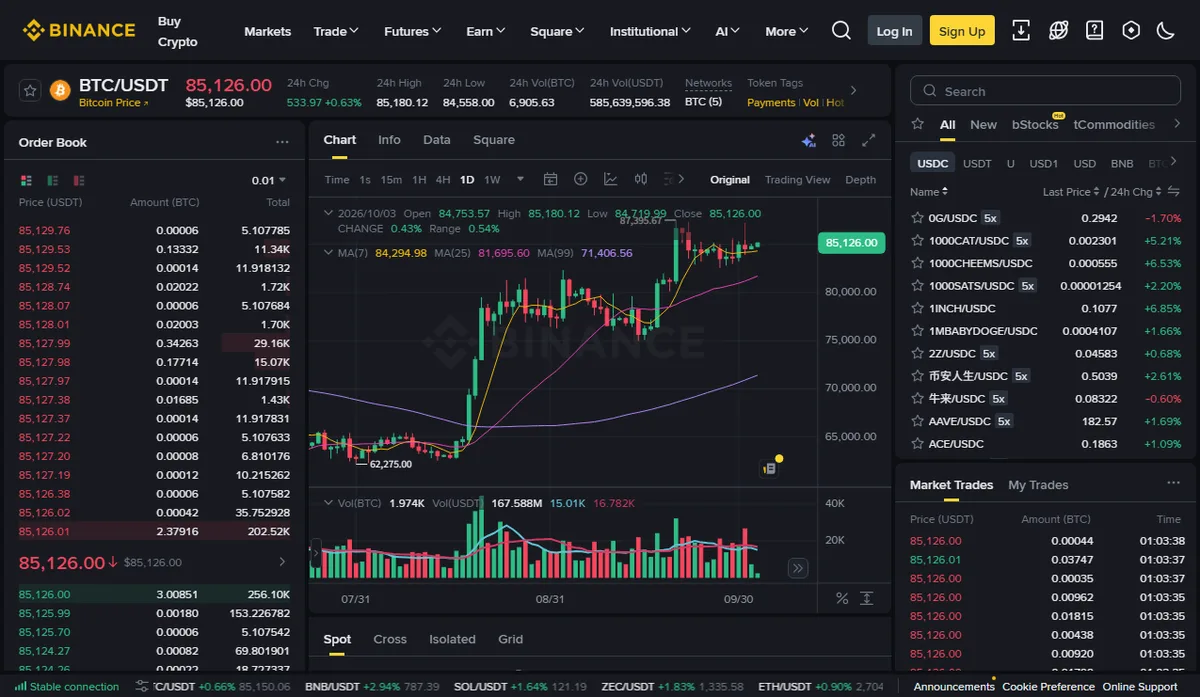
The statistics strip at the top follows the same rule. "24h Vol(BTC)" counts how many bitcoins changed hands. "24h Vol(USDT)" counts what those trades were worth in USDT. One figure being far larger than the other is expected, since they measure different things.
Total is multiplication: price × amount. Suppose an ask row shows 80,000 and 0.002. That row is worth 160 USDT. If you ever meet a screen that leaves units out of the header, work out which asset the product lands in and the units of the other columns follow.
Which balance a resting order reserves: USDT when buying, BTC when selling
An unfilled limit order needs funds set aside before it can rest on the book. The side decides which funds:
- A BTC/USDT buy reserves the quote asset. A bid for 0.002 BTC at 80,000 holds 160 USDT.
- A BTC/USDT sell reserves the base asset. Offering 0.002 BTC holds that 0.002 BTC and leaves the USDT balance alone.
So when a sell is rejected for insufficient balance, the USDT figure is beside the point. This pair needs BTC to sell. If the BTC is in the account but the available amount looks short, check whether other open orders are holding it; the guide on locked balances goes through that.
Market order by amount or by total: which asset each field uses
A market order has no price, so the size has to be stated another way. Binance's Spot API documentation for trading endpoints is explicit. A market order sent with quantity specifies an amount of the base asset. One sent with quoteOrderQty specifies an amount of the quote asset: what you want to spend on a buy, or receive on a sell. The base quantity that actually fills then depends on available liquidity. Where the web order form lets you enter either an amount or a total, this is the distinction underneath.
Say you hold 100 USDT and want all of it in BTC.
Buy by total and the USDT you spend is fixed while the BTC you receive floats. Buy by amount, say 0.00125 BTC (100 ÷ 80,000), and the BTC is fixed while the cost floats with whichever asks you take. If the market moves to 80,400 as the order arrives, 0.00125 BTC costs 100.5 USDT, more than you hold. To use up a set sum, the total field fits better. To end up with a set quantity, use amount.
Selling works the other way round. Sell by amount and the BTC leaving your account is fixed. Sell by total and the USDT you receive is fixed while the BTC sold moves with price. Whether the visible book can absorb the order at all is covered in checking depth before a market order.
On ETH/BTC the price is in BTC, not dollars
The quote asset need not be a stablecoin. ETH/BTC has ETH as base and BTC as quote, so a price of 0.03 means one ETH costs 0.03 BTC.
Buying ETH/BTC spends BTC. Holding only USDT, you cannot place that bid. Either acquire BTC first through BTC/USDT, or trade ETH/USDT directly. Both routes end in ETH. The first adds a second fill, which means one more fee and one more round of quantity rounding.
The same base asset against different quote assets gives separate order books. BTC/USDT and BTC/USDC usually trade close together, yet their orders, depth and last trades are independent. An order resting on one will not show in the open orders of the other. When a fresh order seems to have vanished, read both halves of the pair again.
Watch for pairs where a stablecoin sits on the left, in the form USDT/some fiat currency. USDT is then the base asset. "Buy" means paying that fiat currency for USDT, and the price tells you how much fiat one USDT costs. Same rule; the stablecoin has simply moved to the other side of the slash.
Before you submit, check the form says Spot rather than Cross or Isolated
The same BTC/USDT page carries a row of tabs above the order form. In the capture they read Spot, Cross, Isolated and Grid. Cross and Isolated are the two margin modes; Grid is a strategy tool. The pair name is identical across all four, but the funds used and the rules applied are not.
Every guide on this site deals with spot orders. A glance at the tab before submitting is quicker than searching spot history for an order that was in fact placed on margin.
Checking a fill: amount against the base asset, total against the quote asset
Run a teaching record through it.
| Field in the record | Teaching value | Unit |
|---|---|---|
| Pair / side | BTC/USDT, buy | — |
| Fill price | 80,000 | USDT per 1 BTC |
| Filled amount | 0.00125 | BTC |
| Total | 100 | USDT |
0.00125 × 80,000 = 100. If the product matches, your reading of the units agrees with the record. If it does not, check whether total was read as amount, or whether a fill from another pair slipped in.
A small gap between BTC credited and BTC filled is not automatically an error. The fee may come out of the asset you received, or be charged in a different asset; check that column on its own. Where one order filled in several pieces, add them up as described in order history vs trade history.
Each side of a pair also has its own decimal precision, listed in the API's symbol information as baseAssetPrecision and quoteAssetPrecision. Dividing 100 USDT by a price tends to produce a long decimal. If the form trims it or rejects the quantity, the reason is in quantity step size.